#add library() calls
library(here)here() starts at /home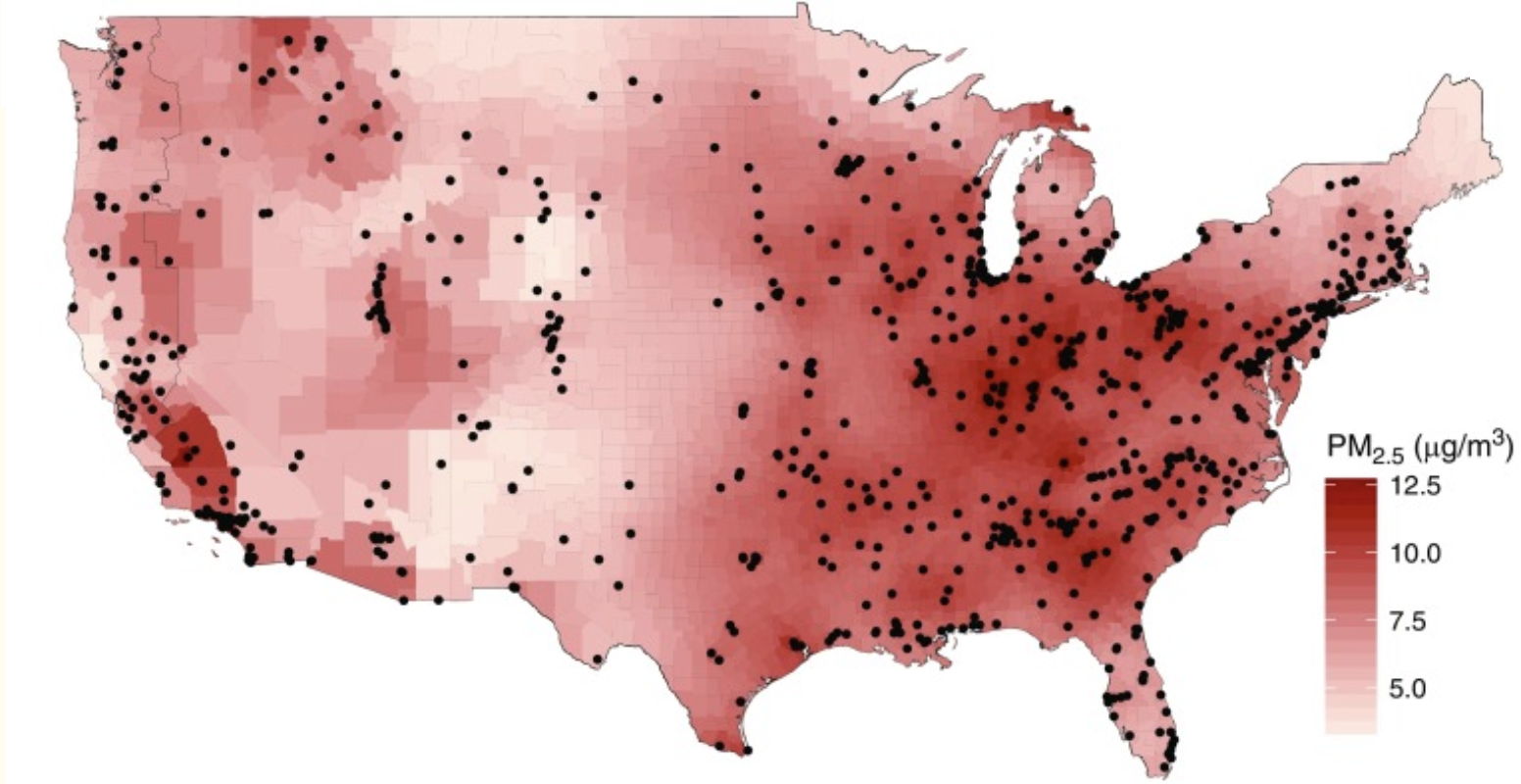
Disclaimer
The purpose of the Open Case Studies project is to demonstrate the use of various data science methods, tools, and software in the context of messy, real-world data. A given case study does not cover all aspects of the research process, is not claiming to be the most appropriate way to analyze a given data set, and should not be used in the context of making policy or clinical decisions without external consultation from scientific experts or medical care professionals. In addition, due to size constraints, datasets used within a case study may be a subset of the original/full dataset.
License information
This work is licensed under the Creative Commons Attribution-NonCommercial 4.0 (CC BY-NC 4.0) United States License unless otherwise noted.
Funding information
This work is funded through the National Institutes of Health, specifically the National Institute of General Medical Sciences: Grant Number 1R25GM160622.
To cite this case study, please use:
{Fill In Authors}. {(YEAR)}. {github source url}. {Title} {(Version)}.
GitHub repository
To access the GitHub repository for this case study see here: {LINK}
Keywords
Prerequisites
Add a list of prerequisites here.
This case study explores {}…
Definition
Provide the definition here
Images are very helpful within this section….
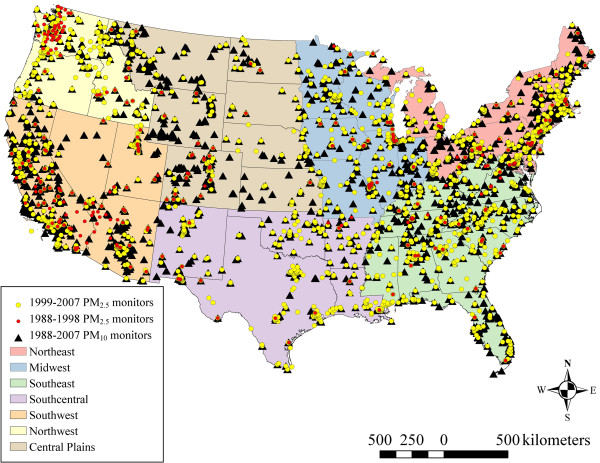
In these background citations, you may want to reference information like knuth, 1984 (Knuth 1984). These will automatically be added into the References subsection of the Additional Information section near the end of the case study. It is good to also add a direct link the the reference where appropriate. See the references.bib file for where @knuth84 came from. Tools like Zotero can help you get the bib version of the citation and some journals will help you copy paste it more readily.
This template also utilizes a quarto extension to enable some glossary functionality. is an example where if you click and hold “Term 1”, the definition stored in glossary.yml for “Term 1” will be displayed. will unlock the same functionality for Term2 also stored in glossary.yml. Adding terms to glossary.yml uses the following pattern. Note the two spaces at the beginning of each definition line.
glossary.yml
Term 1: |
  Definition of Term 1
Term2: |
  Definition of Term2
We’ve added code to print out all of the terms stored in glossary.yml as a table within the Additional Information section before listing references. Note that this is in place of the table functionality from the extension and this will display every term in the .yml file whether it is referenced in the case study or not.
Our main question(s)
In this case study, we will explore {}.
This case study will particularly focus on {}.
The skills, methods, and concepts that students will be familiar with by the end of this case study are:
Data Science/Bioinformatics Learning Objectives:
Biological/Topical Learning Objectives:
| Learning Goal | Applications / Practice | Location |
|---|---|---|
| Term related to a learning objective | Description of action or activity that will reinforce that LO | Data Import |
| Another term | Description of its activity | Data Wrangling |
| Another learning objective concept | Another description of this one’s activity | Data Visualization |
We will begin by loading the packages that we will need:
#add library() calls
library(here)
here() starts at /home| Package | Use |
|---|---|
| {Package Name} | {Package use} |
| {Package Name} | {Package use} |
The first time we use a function, we will use the :: to indicate which package we are using. Unless we have overlapping function names, this is not necessary, but we will include it here to be informative about where the functions we will use come from.
{FILL IN}
| Variable | Details |
|---|---|
| variable1 | Variable info – more details – more details Example: Content content |
| variable2 | Variable info – more details – more details Example: Content content |
There are some important considerations regarding this data analysis to keep in mind:
There are some important ethical considerations when working with data relating to this case study’s main questions.
pm <-readr::read_csv(here("data", "raw", "pm25_data.csv"))Rows: 876 Columns: 50
── Column specification ────────────────────────────────────────────────────────
Delimiter: ","
chr (3): state, county, city
dbl (47): id, value, fips, lat, lon, CMAQ, zcta, zcta_area, zcta_pop, imp_a5...
ℹ Use `spec()` to retrieve the full column specification for this data.
ℹ Specify the column types or set `show_col_types = FALSE` to quiet this message.save(pm, file = here::here("data", "imported", "pm25_data_imported.rda"))If you have been following along but stopped, we could load our imported data like so:
load(here::here("data", "imported", "pm25_data_imported.rda"))An RDA version (stands for R data) of the data can be found here or slightly more directly here. Download this file and then place it in your current working directory within a subdirectory called “imported” within a directory called “data” to use the following code. We used an RStudio project and the here package to navigate to the file more easily.
load(here::here("data", "imported", "co2_data_imported.rda"))To allow users to skip import and wrangling we will save the data as an RDA file as well as a CSV file as this is often useful to send our data to collaborators. We will save this in a “wrangled” subdirectory of our “data” directory of our working directory.
If you have been following along but stopped, we could load our wrangled data like so:
load(here::here("data", "wrangled", "wrangled_data.rda"))An RDA file (stands for R data) of the data can be found here or slightly more directly here. Download this file and then place it in your current working directory within a subdirectory called “wrangled” within a subdirectory called “data” to use the following code. We used an RStudio project and the here package to navigate to the file more easily.
load(here::here("data", "wrangled", "wrangled_data.rda"))If you have been following along but stopped, we could load our wrangled data like so:
load(here::here("data", "wrangled", "wrangled_data.rda"))An RDA file (stands for R data) of the data can be found here or slightly more directly here. Download this file and then place it in your current working directory within a subdirectory called “wrangled” within a subdirectory called “data” to use the following code. We used an RStudio project and the here package to navigate to the file more easily.
load(here::here("data", "wrangled", "wrangled_data.rda"))Question opportunity
We might use a column margin note to add an equation or some other annotation for learners or educators.
In this section, you may want to provide learners with some guidance on ways to incorporate AI while they are developing their analysis. They may want AI to
So, we have developed an AI box that you can pop in whenever you want to do something like this. Note that every time an .ai_box is used throughout the case study, a lua filter will automatically add an AI use disclaimer/margin note to accompany the box during rendering.
You will want to the use the { .default .code-overflow-wrap } next to the three backticks exactly to make sure that the suggested prompts have a copy button and have wrapped text instead of scroll text
AI use considerations
Context: Provide context here
Note if there is any context (e.g., a script) that the learner should also provide the chatbot in addition to the prompt
Suggested Prompt:
Suggested prompt that learners will be able to copy and pasteValidation: Provide guidance to learners on how they should check or validate the response they have received from AI
AI Use Disclaimer:
Follow any relevant required guidelines/policies for AI use.
Examples
Your team or lab, institution, funding organization, or publisher. These requirements should take precedence over our suggestions.
Check AI responses critically, as they may be inaccurate, out-of-date, incomplete, or unnecessarily complicated.
Examples
Disclose your AI use (including model and versions).
Never provide sensitive data to a public AI tool.
Examples
Patient or student data, passwords, credentials, API keys, unpublished manuscripts or grants, and other proprietary code or internal documents.
Be specific in your prompts and ask the AI tool to help you understand the code.
The confidence of an AI tool does not indicate if its responses are correct. They may also agree with you when you are wrong.
AI may respond differently to the same repeated prompt. Be sure to document what you can for the sake of reproducibility.
Recognize that you may need to iteratively improve your prompt to reach the desired output.
Finally, you may want to provide information about reproducibility considerations …. this box may be appropriate in several places throughout the case study, but perhaps you’ll want a note right before summary. Use something like the following for such cases:
Reproducibility considerations
Here you’ll spotlight the reproducibility consideration or thought…This could be a note about needing a specific script or container or what reproducibility concept this is related to (e.g., file management, etc.)
| Question | Current answer | Caveat |
|---|---|---|
| Reiteration or restatement of main question | Describe the answer based on case study activities | List any important caveats potentially connecting to earlier limitations |
| Another main question | Description of its activity | Caveats for this Q & A |
| Another of the main questions | Another description of this one’s activity | Q & A specific caveats |
Common Next Steps
Discuss common next steps for this type of an analysis in this box. Is there a specific number of steps that you need to do before a specific step? Is a “next step” more of an alternate step?
Use this section to suggest different levels of exercises that build upon topics from the case study … next steps, tangential skills, diving deeper into a side quest, etc.
Perhaps explain how the suggested exercises relate to the common next steps.
Terms and concepts covered:
Packages used in this case study:
| Term | Definition |
|---|---|
| Term 1 | Definition of Term 1 |
| Term2 | Definition of Term 2 |
devtools::session_info()─ Session info ───────────────────────────────────────────────────────────────
setting value
version R version 4.3.2 (2023-10-31)
os Ubuntu 22.04.4 LTS
system x86_64, linux-gnu
ui X11
language (EN)
collate en_US.UTF-8
ctype en_US.UTF-8
tz Etc/UTC
date 2026-08-05
pandoc 3.1.1 @ /usr/local/bin/ (via rmarkdown)
─ Packages ───────────────────────────────────────────────────────────────────
package * version date (UTC) lib source
bit 4.0.5 2022-11-15 [1] RSPM (R 4.3.0)
bit64 4.0.5 2020-08-30 [1] RSPM (R 4.3.0)
cachem 1.0.8 2023-05-01 [1] RSPM (R 4.3.0)
cli 3.6.5 2025-04-23 [1] CRAN (R 4.3.2)
crayon 1.5.2 2022-09-29 [1] RSPM (R 4.3.0)
devtools 2.4.5 2022-10-11 [1] RSPM (R 4.3.0)
digest 0.6.34 2024-01-11 [1] RSPM (R 4.3.0)
ellipsis 0.3.2 2021-04-29 [1] RSPM (R 4.3.0)
evaluate 1.0.5 2025-08-27 [1] CRAN (R 4.3.2)
fansi 1.0.6 2023-12-08 [1] RSPM (R 4.3.0)
fastmap 1.1.1 2023-02-24 [1] RSPM (R 4.3.0)
fs 1.6.3 2023-07-20 [1] RSPM (R 4.3.0)
glue 1.7.0 2024-01-09 [1] RSPM (R 4.3.0)
here * 1.0.2 2025-09-15 [1] CRAN (R 4.3.2)
hms 1.1.3 2023-03-21 [1] RSPM (R 4.3.0)
htmltools 0.5.7 2023-11-03 [1] RSPM (R 4.3.0)
htmlwidgets 1.6.4 2023-12-06 [1] RSPM (R 4.3.0)
httpuv 1.6.14 2024-01-26 [1] RSPM (R 4.3.0)
jsonlite 2.0.0 2025-03-27 [1] CRAN (R 4.3.2)
knitr 1.50 2025-03-16 [1] CRAN (R 4.3.2)
later 1.3.2 2023-12-06 [1] RSPM (R 4.3.0)
lifecycle 1.0.4 2023-11-07 [1] RSPM (R 4.3.0)
magrittr 2.0.3 2022-03-30 [1] RSPM (R 4.3.0)
memoise 2.0.1 2021-11-26 [1] RSPM (R 4.3.0)
mime 0.12 2021-09-28 [1] RSPM (R 4.3.0)
miniUI 0.1.1.1 2018-05-18 [1] RSPM (R 4.3.0)
pillar 1.9.0 2023-03-22 [1] RSPM (R 4.3.0)
pkgbuild 1.4.3 2023-12-10 [1] RSPM (R 4.3.0)
pkgconfig 2.0.3 2019-09-22 [1] RSPM (R 4.3.0)
pkgload 1.4.1 2025-09-23 [1] CRAN (R 4.3.2)
profvis 0.3.8 2023-05-02 [1] RSPM (R 4.3.0)
promises 1.2.1 2023-08-10 [1] RSPM (R 4.3.0)
purrr 1.0.2 2023-08-10 [1] RSPM (R 4.3.0)
R6 2.6.1 2025-02-15 [1] CRAN (R 4.3.2)
Rcpp 1.0.12 2024-01-09 [1] RSPM (R 4.3.0)
readr 2.1.5 2024-01-10 [1] RSPM (R 4.3.0)
remotes 2.4.2.1 2023-07-18 [1] RSPM (R 4.3.0)
rlang 1.1.6 2025-04-11 [1] CRAN (R 4.3.2)
rmarkdown 2.25 2023-09-18 [1] RSPM (R 4.3.0)
rprojroot 2.1.1 2025-08-26 [1] CRAN (R 4.3.2)
sessioninfo 1.2.2 2021-12-06 [1] RSPM (R 4.3.0)
shiny 1.8.0 2023-11-17 [1] RSPM (R 4.3.0)
stringi 1.8.3 2023-12-11 [1] RSPM (R 4.3.0)
stringr 1.5.1 2023-11-14 [1] RSPM (R 4.3.0)
tibble 3.3.0 2025-06-08 [1] CRAN (R 4.3.2)
tidyselect 1.2.0 2022-10-10 [1] RSPM (R 4.3.0)
tzdb 0.4.0 2023-05-12 [1] RSPM (R 4.3.0)
urlchecker 1.0.1 2021-11-30 [1] RSPM (R 4.3.0)
usethis 2.2.3 2024-02-19 [1] RSPM (R 4.3.0)
utf8 1.2.4 2023-10-22 [1] RSPM (R 4.3.0)
vctrs 0.6.5 2023-12-01 [1] RSPM (R 4.3.0)
vroom 1.6.5 2023-12-05 [1] RSPM (R 4.3.0)
xfun 0.55 2025-12-16 [1] CRAN (R 4.3.2)
xtable 1.8-4 2019-04-21 [1] RSPM (R 4.3.0)
yaml * 2.3.12 2025-12-10 [1] CRAN (R 4.3.2)
[1] /usr/local/lib/R/site-library
[2] /usr/local/lib/R/library
──────────────────────────────────────────────────────────────────────────────We would also like to acknowledge the National Institute of General Medical Sciences for funding this work (1R25GM160622).
Icons are from iconpacks.